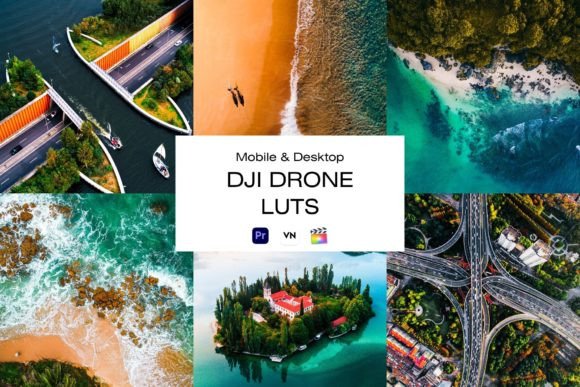
Transform Raw DJI Drone Footage into Cinematic Gold
The Real Challenge of Drone Video Editing
Anyone who has spent time with a DJI drone knows the thrill of capturing sweeping landscapes, dynamic cityscapes, or unique aerial perspectives. The footage from these cameras is incredibly detailed and full of potential. However, the raw video straight from the sensor often lacks a certain punch. It can look flat, desaturated, or simply not reflect the dramatic mood you felt while flying. This is where the art and science of color grading become essential, and a specialized tool like a DJI Drone LUT pack is not just helpful—it's transformative.
A LUT, or Look-Up Table, is essentially a color grading preset. Think of it as a recipe that tells your video editing software how to remap the colors, contrast, and tones in your footage. Instead of manually adjusting dozens of sliders for each clip, a well-crafted LUT applies a consistent, professional-grade look with a single click. Our pack of 10 DJI Drone LUTs is designed specifically for the color science of DJI cameras, ensuring the transformations are nuanced and effective, not just a generic filter slapped onto your content.
What Defines the "Cinematic Look"?
So, what does this cinematic style actually look like? It's more than just making things darker or more colorful. It's about creating a specific visual personality. Our DJI Drone LUTs are built to introduce a balanced contrast that adds depth and dimension without crushing the blacks or blowing out the highlights. You'll notice a subtle, sophisticated color shift—often enhancing blues in the sky and water, warming golden hour light, or adding a touch of teal to shadows for that popular modern aesthetic.
The overall appeal is one of professionalism and intentionality. It moves your footage away from a "home video" or "generic stock" feel and towards something you might see in a travel documentary, a real estate showcase, or a brand film. The style is versatile, ranging from clean and natural enhancements to more stylized, moody treatments. This allows you to choose a look that best supports your story, whether it's for a vibrant travel vlog or a sleek corporate presentation.
Practical Applications Across Your Projects
The true value of a tool lies in how you use it. For content creators and bloggers, these LUTs are a massive time-saver. Applying a consistent grade across all your drone clips in a video creates a cohesive, professional brand identity that keeps viewers engaged. Marketers and entrepreneurs can use them to produce stunning promotional videos, property tours, or event highlights that stand out in crowded social media feeds. The right color grade can make a product look more premium or a service feel more aspirational.
For designers and publishers, the applications extend beyond video. Still frames exported from your graded footage can become powerful assets for web design, social media graphics, or print materials. Imagine using a beautifully color-graded aerial shot as a hero image on a website or in a brochure. It provides an immediate sense of quality and atmosphere. The LUTs work seamlessly across major platforms, whether you edit on desktop software like Premiere Pro, DaVinci Resolve, or Final Cut Pro, or on mobile with apps like VN Video Editor. This flexibility is crucial for modern workflows where content is created and edited on the go.
Integrating LUTs into Your Editing Workflow
Choosing the right LUT is the first step. Preview them on a key clip from your project. Does it enhance the mood you're going for? Does it make the colors feel more alive? Once selected, apply it to all your clips from that same lighting scenario for immediate consistency. The key is to treat the LUT as a starting point, not an absolute endpoint. Every video is unique, and a small adjustment to exposure, contrast, or white balance after applying the LUT can perfect the look for that specific shot.
Consider your font pairings in the context of the video's overall design. A clean, modern sans serif font for on-screen text might pair perfectly with a crisp, high-contrast LUT. For a more elegant, documentary-style piece, a classic serif font could complement a warmer, more natural grade. The LUT sets the visual tone, and every other element—from typography to music—should work in harmony with it to build a cohesive brand identity.
Making the Most of Your Design Assets
When you invest in a premium set of design assets like these LUTs, you're investing in efficiency and quality. The included .cube files are the industry standard, ensuring compatibility and high-quality results. The step-by-step installation guide removes any technical guesswork, letting you focus on the creative process. Think of these LUTs as part of your broader toolkit, alongside your choice of typeface, logo design, and brand colors. They help maintain visual consistency across all your digital and print materials, reinforcing professionalism and recognition.
Ultimately, color grading with specialized DJI Drone LUTs is about unlocking the full potential of your footage. It's a practical skill that elevates your content from good to remarkable, helping you tell your story with greater impact and style. By applying these looks, you're not just correcting color—you're crafting an experience for your audience, one that feels polished, intentional, and distinctly yours.